2025 年数字统计
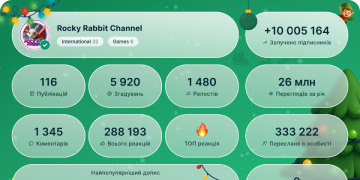
13 430 972
订阅者
+8 68524 小时
+26 0787 天
+107 95330 天
帖子存档
00:10
视频不可用在 Telegram 中显示
Custom Prizes in Giveaways. Giveaways can also include custom prizes for their subscribers – like VIP tickets or exclusive merch.
For even more transparency, hosts can choose to announce the winners with an automated message in the channel.
custom prizes_1.mp42.59 MB
00:21
视频不可用在 Telegram 中显示
Channel Appearance. Channels can customize their appearance as they gain levels – able to change the look of messages and their profile cover or set an emoji status and unique wallpaper for the channel.
To customize your channel, open the Channel Profile > Channel Settings > Appearance. A list of all channel perks is available here.
Channel Appearance_1 OPT.mp44.10 MB
00:09
视频不可用在 Telegram 中显示
Code Formatting. Messages with text sent as
```code``` automatically identify the coding language used and highlight syntax – and you can click or tap to instantly copy the code.
Working with code blocks works best on the Telegram Desktop app, Telegram Web or Telegram for macOS.code formatting OPT.mp43.79 MB
00:16
视频不可用在 Telegram 中显示
⭐️ Wallpapers for Both Sides. You can give any 1-on-1 chat a custom wallpaper to help it stand out.
Premium users can set their wallpaper for both sides – applying the same appearance for their chat partner.
wallpapers both sides_1.mp44.08 MB
00:08
视频不可用在 Telegram 中显示
⭐️ Profile Colors. In addition to their messages, Premium users can select a unique color combination for their profile page – and add emoji for extra decoration.
On Android, these settings are available via Settings > Chat Settings > Change Your Color. On iOS, it's Settings > Appearance > Your Color.
profile colors_1.mp41.96 MB
00:13
视频不可用在 Telegram 中显示
Video Messages on Stories. When creating or reposting a story, you can add a video message to give extra commentary or record your reaction.
Video messages can be resized, moved around the screen and placed anywhere along the timeline.
To record a video message, hold the 📷 camera icon in the story editor. The volume can be changed by holding its video track at the bottom.
reposting stories.mp43.41 MB
00:16
视频不可用在 Telegram 中显示
Similar Channels. When joining a new channel, a list of similar public channels appears – which you can browse to find more news, content and memes.
For channels you've already joined, you can also see the list on the channel's profile.
similar channels.mp44.14 MB
00:18
视频不可用在 Telegram 中显示
Creating Giveaways. Channel hosts can choose exactly who is eligible for giveaway prizes – all subscribers or new subscribers, only people from specific countries, or require that participants subscribe to other channels.
Prizes must be paid for in advance – this can be done from any Telegram app, but @PremiumBot and Fragment are more affordable and allow for larger giveaways.
By giving away subscriptions to Telegram Premium, channels can earn more boosts – automatically receiving 4 boosts for each subscription they give away.
create giveaway_1.mp44.44 MB
00:20
视频不可用在 Telegram 中显示
Giveaways in Channels. Channel owners can promote their community and reward subscribers by hosting a giveaway.
Giveaways are a verifiable and transparent way for subscribers to earn prizes – like Telegram Premium and much more.
Channels set the giveaway criteria and pay for prizes in advance – then Telegram randomly selects the winners and hands out their gifts.
giveaways_1.mp44.99 MB
00:08
视频不可用在 Telegram 中显示
Stories: Front Flash Settings. When using the front-facing camera for a story, hold the ⚡icon to adjust the warmth and intensity of the front flash.
front flash stories_1.mp41.90 MB
00:06
视频不可用在 Telegram 中显示
Fast Forward and Rewind Stories. While browsing stories, hold down to pause and then slide left or right to rewind and fast forward.
fast and rewind stories blog_1.mp41.35 MB
00:18
视频不可用在 Telegram 中显示
⭐️ Account Colors. With Telegram Premium, you can choose a specific color or color combination for your account.
This color will be used for your name in all groups, the links you send, and replies to your messages.
You can also choose from hundreds of icons, creating a unique pattern for your messages when quoted or replied to.
account colors blog_1.mp44.54 MB
00:05
视频不可用在 Telegram 中显示
Reply, Forward and Link Settings. When you combine replies, forwarded messages and links, you can quickly access their unique settings from separate tabs at the bottom of the screen.
Reply forward link settings blog_1.mp41.13 MB
00:13
视频不可用在 Telegram 中显示
Adjustable Link Previews. When sharing a link, you can customize its preview – change the size of media, place the preview above or below your message and select which link to preview if there are multiple.
link previews blog_1.mp43.30 MB
00:21
视频不可用在 Telegram 中显示
Quote Replies. You can quote specific parts of any message – and reply to just one sentence or a few words.
To quote someone, highlight text from their message or swipe to reply, tap the reply bar and select Quote.
You can also add quote formatting to any text from the formatting menu, in order to put multiple quotes in one message.
Tap the reply bar above your text to reply in another chat – in case you want to reply privately, or in a different group or channel.
Replies Blog FIx OPT.mp44.24 MB
00:06
视频不可用在 Telegram 中显示
New Login Alerts. Whenever a device logs in to your account, a notification is sent to all your devices, and the new login is added to your Devices page.
Additionally, a login alert will appear at the top of your chat list – if you don't recognize the device, instantly tap to secure your account.
For even more security, consider adding a Two-Step Verification password to your account.
new login alerts OPT.mp44.01 KB
00:16
视频不可用在 Telegram 中显示
View-Once Media. In any 1-on-1 chat, photos and videos can be sent as View Once – which permanently deletes the media after it is opened.
Tapping the 1️⃣ icon in the media editor lets you send media as View Once or with a timer – media sent with a timer can be re-opened until the timer runs out.
view-once media OPT.mp43.23 MB
00:04
视频不可用在 Telegram 中显示
Your Music in Stories. Audio files on your device can be added to stories – giving your content custom soundtracks and narration.
From the sticker panel, tap 'Audio' and select a file, then adjust the track to select a section.
In video stories, you can move your added audio track to any point in the story, and can choose to keep the original sound as well.
Music in Stories OPT.mp47.49 KB
00:25
视频不可用在 Telegram 中显示
Reaction Stickers in Stories. Both users and channels can add reaction stickers to their stories – letting viewers respond with more emoji in one tap.
To add one, simply tap the 💭 icon in the sticker panel and choose any emoji – Premium subscribers can use their custom emoji as well.
Channel stories display reaction counters, showing how many people chose each emotion.
Reaction Stickers OPT.mp46.21 MB
00:17
视频不可用在 Telegram 中显示
Stories for Channels. Users can grant their favorite channels the ability to post stories by giving them boosts.
Channels collect boosts by sharing their unique boost link – each Premium subscriber has 1 boost that they can assign to any channel.
As more people boost a channel, it levels up – allowing the channel to post more stories per day.
To get the boost link for your channel, go to Channel Info > More > Statistics > Boosts. More info on boosts and channel stories is available in our FAQ.
Stories for Channels.mp44.45 MB