
Telegram Tips
Open in Telegram
Telegram stands for freedom and privacy and has many easy to use features.
Show more2025 year in numbers
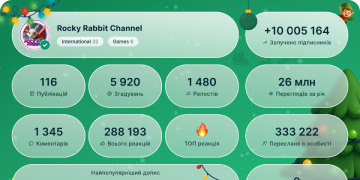
13 429 616
Subscribers
+8 68524 hours
+26 0787 days
+107 95330 days
Posts Archive
00:13
Video unavailableShow in Telegram
💼 Greeting Messages. Businesses can write a greeting that is instantly sent to users that contact them for the first time – or who send a new message after a period of inactivity.
You can set your greeting to only be used for specific chats and chat categories, or to exclude certain chats.
Greeting News OPT.mp42.26 MB
00:04
Video unavailableShow in Telegram
💼 Location and Business Hours. Telegram users can convert their profile to a business page – adding the location and business hours of their company.
To add business info to your profile or create automated greetings, away messages and quick replies – go to Settings > Telegram Business.
Location news OPT.mp45.96 KB
00:04
Video unavailableShow in Telegram
Telegram Business lets users convert their profile to a business page and unlock extra features like:
💼 Location and Business Hours
💼 Greeting Messages
💼 Away Messages
💼 Quick Replies
💼 Folder Tags
Telegram Premium subscribers are currently able to access all Business features for free.
To see the full list of features, go to Settings > Telegram Business in any app.
biz splash.mp47.57 KB
00:09
Video unavailableShow in Telegram
Group Emoji. Admins of boosted groups can set a group emoji pack – unlocking one set of emoji that all members can use in the chat.
Custom emoji are an open platform – so you can choose a set from Telegram artists, or create a unique pack just for your community.
emoji en.mp42.14 MB
00:19
Video unavailableShow in Telegram
Group Appearance Settings. Boosted groups have unique customization options – able to change the color and logo of the group's profile cover, set an emoji status or add a chat-wide wallpaper.
Admins with the 'Change Group Info' permission can access these settings from the Group's Profile > Edit > Appearance.
appearance EN OPT.mp42.36 MB
00:17
Video unavailableShow in Telegram
Stories from Groups. Admins of groups that receive enough boosts are able to post stories as the group.
For each level a group gains, it can post 1 additional story per day. Replies to a group's story are sent to the chat – sparking new conversations.
Admins with the proper permissions can tap the story icon 📖 on the group's profile or select the group in the 'Post Story As' section of the story editor.
stories EN OPT.mp43.53 MB
00:11
Video unavailableShow in Telegram
Boosts for Groups. Groups level up by receiving boosts from members or via giveaways.
Those who boost the group get an exclusive badge and allow the group to post stories and change its appearance.
At higher levels, groups unlock features for all members to use in the chat – like custom emoji and voice transcription.
boost en OPT.mp42.47 MB
00:12
Video unavailableShow in Telegram
Saved in Shared Media. Every chat has a shared media section on its profile page – simply tap at the top of the chat to open it.
The 'Saved' tab contains any messages that you've forwarded to your Saved Messages from that chat.
Saved in Shared Media (1).mp43.03 MB
00:11
Video unavailableShow in Telegram
⭐️ Tags for Saved Messages. Premium users can organize Saved Messages by adding multiple tags to use as search filters.
Tags are based on emoji, which you apply by reacting to the message.
For more description, you can give tags a name as well – simply hold down on a tag and select 'Set Name'.
Tags for Saved Messages (1).mp42.78 MB
00:09
Video unavailableShow in Telegram
View Saved Messages by Chat. The View as Chats mode in Saved Messages lets you see a list of chats from which you've forwarded messages.
Each chat contains all the messages you saved from other users, groups, and channels.
When viewing as chats, you can pin chats in any order – and the app will remember your view preference.
To change layouts, tap➕or ➕ to View as Chats or View as Messages.
Saved Messages by Chat (1).mp42.21 MB
00:12
Video unavailableShow in Telegram
⭐️ Private Message Permissions. Premium users can select who is able to send them messages – either Everyone or My Contacts and Premium Users.
When enabled, users who aren't contacts or don't have Premium can't start chats with you – but can reply if you message them first.
Accept Messages Blog EN OPT.mp41.94 MB
00:17
Video unavailableShow in Telegram
⭐️ One-Way Last Seen and Read Times. Users who hide their read time aren't able to see read times from other users.
Except with Telegram Premium – which allows you to hide your read time and still see the read times of users who share theirs with you.
If a user hides their read time, it is always hidden from all users, including Premium users.
View Others Blog EN OPT.mp42.91 MB
00:10
Video unavailableShow in Telegram
Read Time in Private Chats. In 1-on-1 chats, you can see the exact time when your message was opened.
Read times have granular privacy settings, based on the settings for your Last Seen status.
To protect privacy, all read times are only visible for 7 days before beint deleted.
Read Time Blog EN.mp42.27 MB
00:08
Video unavailableShow in Telegram
Watching One-Time Messages. One-time voice and video messages can't be paused and can't be opened more than once.
The message will play until it finishes, or until you tap 'Close and Delete' – vanishing with a beautiful animation.
One-Time Video Messages EN.mp41.83 MB
00:11
Video unavailableShow in Telegram
Pause and Resume Recording.
While recording any voice or video message you can pause and then resume recording later – without having to start over.
To pause recording, swipe up and tap the pause button. To resume recording, tap the microphone🎤or camera 📷 icon.
Pause and Resume OPT.mp42.70 MB
00:17
Video unavailableShow in Telegram
One-Time Voice and Video Messages. The view-once setting can also be used for voice and video messages – after being played, the message is automatically deleted.
To set a message as view-once, swipe up to lock recording and then tap the view-once ⏲️ icon.
One-Time voice OPT.mp44.03 MB
00:23
Video unavailableShow in Telegram
Calls. Calling another user lets you talk, turn on your camera or share your screen – all protected by end-to-end encryption.
Calls are available on every platform – to call a user, simply open their profile and tap the 📞 call button.
Calls OPT.mp48.38 MB
00:10
Video unavailableShow in Telegram
Photo Cutouts in Stories. Photos from your gallery can be placed on top of stories to create custom scenes or memes.
For a seamless edit, you can remove the background from photos by tapping 'Cut Out'.
photo cutouts OPT.mp41.85 MB
00:10
Video unavailableShow in Telegram
Massive Premium Gifts. The 'Gift Premium' section in Settings lets you give up to 10 users Telegram Premium in one tap.
If one of those users already has Premium, they can save the gift to activate later or send it to a friend.
Massive Premium Gifts_1 OPT.mp41.83 MB
00:11
Video unavailableShow in Telegram
Share Posts in Stories. Channel messages of any type can be reposted as stories – adding a copy of the message that you can move, resize and decorate.
Anyone who views your story can tap to open the message in its channel. To repost a message, tap its share arrow ➡️ and select 'Repost to Story'.
Share Posts in Stories_1.mp42.71 MB